AI Agent vs Chatbot: What Actually Changes When You Build One
If you have wired up an LLM API before, you already know how satisfying the first working version feels. You send a prompt, you get text back, you render it in a chat window, and it works. Then someone asks whether it can check their order status, and the whole architecture has to change. That is the line between an AI agent and a chatbot, and it is worth understanding before you start building, because the two need genuinely different code — not just a different prompt.
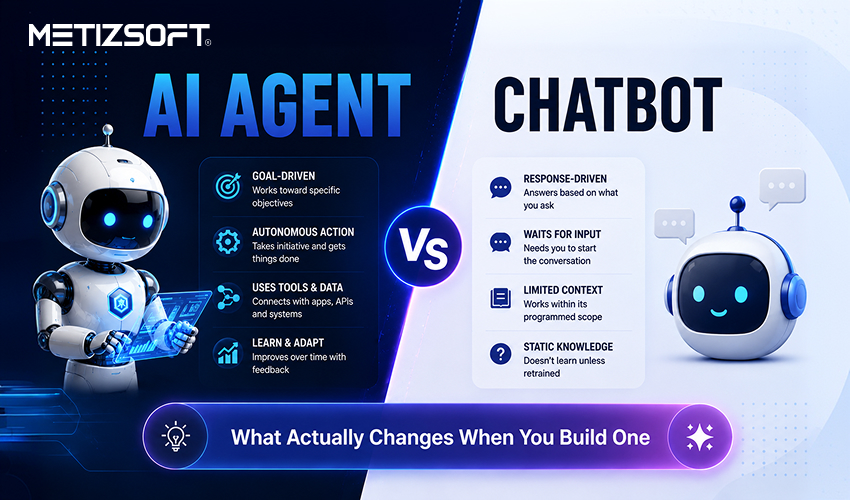
The Difference in One Sentence
A chatbot generates text. An agent decides what to do and then does it.
Practically, a chatbot is a single request and a single response. You pass the conversation history, you get a reply, you display it. The model never touches anything outside the conversation.
An agent runs in a loop. The model receives a goal, decides which tool to call, receives the result of that call, decides whether it is finished, and repeats until it is. Your code is no longer a request handler. It is a scheduler.
| | Chatbot | AI Agent |
| Interaction pattern | Single request, single response | Multi-step loop |
| Can take real actions | No | Yes — calls tools, APIs, systems |
| State | Conversation history only | Goal, tool results, decisions across steps |
| Failure mode | Wrong or unhelpful answer | Wrong action taken, or infinite loop |
| Typical build time | Days | Weeks, plus ongoing evaluation |
| Right for | Answering questions, support, FAQs | Multi-step tasks: booking, processing, resolving |
1. What the Agent Loop Actually Looks Like
Strip away the frameworks and the core is straightforward:
1. Send the goal plus available tools to the model
2. Model responds with either a final answer or a tool call
3. If it is a tool call, execute it in your code
4. Send the tool result back to the model
5. Return to step 2
6. Stop on a final answer, an error, or a step limit
Six steps. You can write that in fifty lines of Python.
The complexity is not in the loop. It is in everything that can go wrong inside it, which is what the rest of this guide covers.
2. Tool Definitions Matter More Than the Prompt
Beginners spend most of their effort on the system prompt. Experienced builders spend it on tool descriptions.
The model chooses tools based on their names, descriptions, and parameter schemas. A vague description produces wrong tool choices that no amount of prompt engineering fixes.
Compare a weak definition:
```json
{
"name": "get_data",
"description": "Gets data"
}
```
With a better one:
```json
{
"name": "get_order_status",
"description": "Look up the current shipping status of a
single order by its order ID. Returns
status, carrier and estimated delivery
date. Use only when the user has provided
an order ID.",
"parameters": {
"order_id": {
"type": "string",
"description": "Order ID in the format ORD-XXXXXX"
}
}
}
The second version tells the model when to use the tool, when not to, and what shape the input takes. That last clause use only when the user has provided an order ID prevents a whole class of hallucinated calls before they happen.
3. Where Agents Break in Production
Four failure modes show up in almost every project.
Infinite loops. The model calls a tool, gets a result it does not like, calls the same tool again with slightly different arguments, and repeats. Always cap the number of iterations. Ten is generous for most tasks.
Confident wrong calls. The model invents an order ID rather than asking for one. Validate every tool input in your own code before executing. Never trust the arguments the model produces.
Context growth. Every tool result gets appended to the conversation. After eight calls returning JSON blobs, you are sending a very large payload on every iteration, and both cost and latency climb with it. Truncate tool results to what the model actually needs.
Silent partial failure. A tool returns an error string, the model treats it as data, and reports success to the user. Return errors in a structurally distinct format and instruct the model explicitly on how to handle them.
4. Start Smaller Than You Think
The most common mistake is building a general-purpose agent first. It works impressively in demos and fails unpredictably in production, because the space of things it might do is unbounded.
A better first project: one goal, two or three tools, a hard iteration limit. Something like a support agent that can look up an order, check a return policy, and escalate to a human. Narrow scope means you can actually test it.
Once that works reliably, add tools one at a time and re-test. Agents degrade quietly as tool count grows, because the model's choice gets harder with every option you add.
5. Chatbot or Agent: Which Does Your Project Need
The honest answer is that most projects do not need a full agent, and building one anyway wastes both time and budget.
Build a chatbot when: the job is answering questions from a known knowledge base FAQs, documentation, product information. No external actions required, no multi-step reasoning. A well-built RAG chatbot solves this cleanly and ships in days.
Build an agent when: the task genuinely requires multiple steps and real actions checking a database, calling an API, updating a record, escalating based on a decision. If the model needs to do something rather than just say something, that is the signal.
A useful test: describe the task in one sentence. If the sentence contains "and then," you probably need an agent. "Answer questions about our return policy" is a chatbot. "Look up the order, check if it's eligible, and then process the refund" is an agent.
6. When It Stops Being a Weekend Project
For personal projects, the stack described above is enough. Production changes the requirements.
You need observability, because when an agent does something strange you have to be able to replay the exact sequence of calls that led there. You need permission boundaries, because an agent with database write access and no constraints is a genuinely dangerous thing. You need evaluation, because prompt changes that improve one behaviour often break another, and without tests you will not notice.
That is the point where many teams bring in an AI agent development company rather than building the operational layer themselves. The model integration is the easy part. The monitoring, guardrails and evaluation harness around it are what take the time and what separates a working demo from something you can trust with real customers and real data.
Where Metizsoft Fits In
Building the six-step loop is genuinely not hard. Building the version that survives production with proper observability, permission boundaries, and an evaluation harness that catches regressions before customers do is where most teams need a partner.
Metizsoft builds AI agents for ecommerce, fintech and enterprise workflows, from a first working prototype through to a monitored production deployment. We have shipped agents that handle multi-step reasoning against real systems, not just demo scripts against sample data.
If you are deciding between a chatbot and an agent for a specific project, that scoping conversation is worth having early it is usually a fifteen-minute call that saves weeks of building the wrong thing.
Book a free 30-minute consultation — metizsoft.com/contact-us
Frequently Asked Questions
What is the difference between an AI agent and a chatbot?
A chatbot answers questions in a single request-response exchange. An AI agent runs in a loop, deciding which tools to call, executing multi-step tasks, and acting on external systems rather than only generating text. If the task requires real actions rather than just answers, it needs an agent.
Is ChatGPT a chatbot or an AI agent?
The base ChatGPT experience is primarily a chatbot a conversational interface generating text responses. Features like browsing, code execution and connected tools move it toward agentic behaviour, since the model is then deciding when to call a tool and acting on the result rather than only replying.
How long does it take to build an AI agent?
A simple, narrowly scoped agent one goal, two or three tools typically takes two to four weeks to build and test properly. Production-grade agents with observability, guardrails and evaluation take six to twelve weeks, depending on how many systems they need to integrate with.
Do I need an AI agent or would a chatbot be enough?
If the task is answering questions from known information, a chatbot is enough and considerably cheaper to build. If the task requires taking multiple steps and real actions checking a system, making a decision, updating a record you need an agent. Most projects overestimate which one they need; a scoping conversation early avoids overbuilding.
What causes AI agents to fail in production?
The most common causes are infinite loops from unclear stopping conditions, the model inventing input values instead of asking for them, tool results accumulating until context windows get expensive and slow, and errors being silently misread as successful results. All four are preventable with proper validation and structured error handling.
Can a chatbot be upgraded into an agent later?
Yes, though it is closer to a rebuild than an upgrade. A chatbot's architecture is a single request-response cycle; an agent needs a loop, tool definitions, and state management the chatbot never had. Reusing the underlying model integration is straightforward the surrounding logic generally needs to be built fresh.
Related Reading
Want to go further? Read How to Hire AI Developers: Skills, Costs and Engagement Models, Custom Shopify App vs App Store App, and Top 10 AI Development and Consulting Companies in India.
About Metizsoft
Metizsoft Solutions is an AI and software development company founded in 2012, with offices in India, the USA, the UK, and Singapore, serving clients across 25+ countries. We specialise in AI agent development, RAG systems, Shopify development, and enterprise software.
Related Services
AI Agent Development | AI Development Services | Hire AI Developer | Machine Learning Development
Leave a Reply